The tools driving this shift do more than connect apps — they layer AI reasoning on top of business processes, enabling teams to handle unstructured data, make contextual decisions, and route actions without human intervention at every step. The result: lower operational overhead, fewer errors, and more time for high-value work. This matters across every sector, from healthcare and oil & gas to financial services and manufacturing.
This guide covers the 10 best AI workflow automation tools in 2026, how they differ, and what to evaluate before committing to one.
Key Takeaways
- AI workflow automation uses LLMs and ML to handle decision-making between apps — beyond simple rule-based triggers
- Top tools range from no-code (Zapier, Make) to developer-grade (n8n, Pipedream) to enterprise-scale (Workato, Power Automate)
- The right tool depends on your team's technical maturity, integration scope, and governance requirements
- Prioritize AI-native capabilities, integration breadth, and compliance controls when evaluating options
- Implementation success hinges more on user adoption than on the technology itself
What Is AI Workflow Automation?
Traditional automation follows fixed rules: if X happens, do Y. AI workflow automation goes further. It uses large language models (LLMs) and machine learning to process unstructured data, interpret context, and make routing decisions based on semantic meaning — rather than conditions someone had to hard-code in advance.
That means connecting CRMs, ERPs, communication tools, and databases, then placing an AI reasoning layer on top. Common use cases include:
- Document processing — extracting and classifying data from invoices, forms, and contracts
- Lead enrichment — pulling data from multiple sources and scoring prospects automatically
- Ticket triage — routing support requests based on content and urgency, not just keywords
- Cross-functional approvals — initiating and tracking multi-step sign-off workflows without manual handoffs
- Employee onboarding — triggering provisioning, notifications, and training sequences automatically
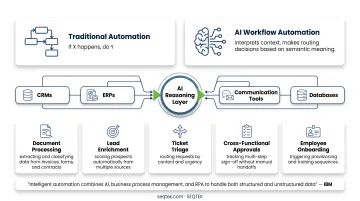
As IBM describes it, intelligent automation combines AI, business process management, and RPA to handle both structured and unstructured data — so systems can act on judgment, not just instructions.
10 Best AI Workflow Automation Tools in 2026
Each tool below was evaluated across six criteria:
- AI-native capabilities — depth of built-in AI features vs. bolt-on integrations
- Integration breadth — connector libraries and API flexibility
- Ease of use — accessibility for non-technical and technical users alike
- Enterprise readiness — governance, security, and compliance controls
- Pricing transparency — clarity of cost structure at each tier
- Real-world user feedback — validated by G2, Capterra, and documented case evidence
Zapier
With 9,000+ app connectors — the largest library in this category — Zapier has become the default starting point for no-code automation. Native AI steps now handle summarizing, classifying, extracting, and routing data without requiring any additional setup.
Its strength is speed. Non-technical users can build reliable, multi-step automations without writing a line of code. For event-driven SaaS workflows, few platforms move faster from idea to working automation.
| Category | Details |
|---|---|
| Best For | Non-technical teams building fast, multi-step SaaS automations with light AI steps |
| Key AI Features | Native AI actions (Summarize, Write, Classify, Extract), Zapier Copilot, AI Agents |
| Pricing | Free plan available; paid plans from $19.99/month (billed annually) |
n8n
n8n is the most mature open-source, self-hostable AI workflow builder available for engineering-forward teams. It runs on Docker, Kubernetes, or npm — giving teams full control over infrastructure and data residency. For regulated industries where sensitive data cannot leave the organization's environment, that control is often the deciding factor.
The community library holds 10,802 workflow templates, including 7,449 in the AI category alone. Its Sustainable Use License (fair-code model) means the core is free and extensible.
| Category | Details |
|---|---|
| Best For | Engineering teams needing self-hosted, open-source automation with custom node extensibility |
| Key AI Features | AI agent nodes, LLM integration, custom JavaScript/Python logic, community AI templates |
| Pricing | Free self-hosted; cloud plans from €20/month (~$22 USD, billed annually) |
Make (formerly Integromat)
Make is the visual, budget-conscious choice for operations and marketing teams running high-volume, multi-branch workflows. Its canvas-based builder lets teams map complex logic with granular routers, iterators, and data transformers — all with strong error handling and replay features.
With 3,000+ integrations and 7,000+ pre-built templates, it strikes a strong balance between flexibility and affordability.
| Category | Details |
|---|---|
| Best For | Ops and marketing teams needing affordable, visually-mapped multi-branch automation |
| Key AI Features | OpenAI/LLM integrations via modules, conditional routing, multi-step data transforms |
| Pricing | Free plan available; paid plans from $12/month for 10,000 credits |
Microsoft Power Automate
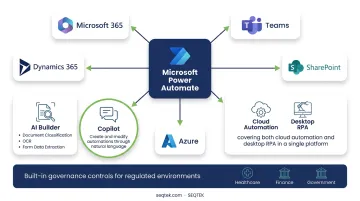
For Microsoft-standardized enterprises, Power Automate is the natural choice. It integrates deeply with M365, Teams, Dynamics, SharePoint, and Azure — covering both cloud automation and desktop RPA in a single platform.
AI Builder adds document classification, OCR, and form data extraction. Copilot lets users create and modify automations through natural language. Built-in governance controls make it a strong fit for regulated environments in healthcare, finance, and government.
| Category | Details |
|---|---|
| Best For | Microsoft-standardized enterprises needing integrated cloud and desktop automation |
| Key AI Features | AI Builder (document processing, OCR, classification), Copilot integration, natural language triggers |
| Pricing | Free trial available; $15/user/month (paid annually) |
Workato
Large organizations in finance, HR, IT, and sales operations turn to Workato when they need governed, multi-system workflows at scale. Its 1,200+ prebuilt connectors cover the breadth of most enterprise application landscapes.
Governance is where Workato justifies its enterprise price point: granular RBAC, activity audit logs, SOC 1/2/3 certification, and AI-assisted recipe building that helps teams move faster without sacrificing control.
| Category | Details |
|---|---|
| Best For | Large enterprises requiring governed, multi-department workflow orchestration with enterprise SLAs |
| Key AI Features | AI-assisted recipe building, semantic routing, pre-built enterprise accelerators |
| Pricing | Custom pricing only; demo required |
Monday.com
Monday.com is a work management platform with a purpose-built automation module that handles repetitive process steps across operations, project management, and IT. What sets it apart is its AI workflow generator: users describe a process in plain language, and Monday.com generates the workflow structure automatically on Pro and Enterprise plans.
Its drag-and-drop builder, real-time insights dashboard, and broad native integrations make it approachable for cross-functional teams without technical overhead.
| Category | Details |
|---|---|
| Best For | Cross-functional teams standardizing project and operational workflows with minimal technical overhead |
| Key AI Features | AI workflow generator, automated notifications, AI-powered task summaries |
| Pricing | Free plan (up to 2 seats); paid plans from $9/seat/month (billed annually) |
ClickUp
ClickUp positions itself as an all-in-one productivity suite where automation is embedded directly into project management. Users can chain triggers, conditions, and actions across tasks and teams — with dynamic assignees and a large pre-built template library making configuration faster.
Brain² AI adds task completion, intelligent summaries, and natural language task creation. The free plan offers a low-risk starting point, though automation limits apply (5 active automations, 100 actions/month on Free Forever).
| Category | Details |
|---|---|
| Best For | Teams wanting customizable automations embedded inside a full project management suite |
| Key AI Features | Brain² AI for task completion, AI-powered updates and summaries, natural language task creation |
| Pricing | Free plan available; paid plans from $7/user/month (billed annually) |
Gumloop
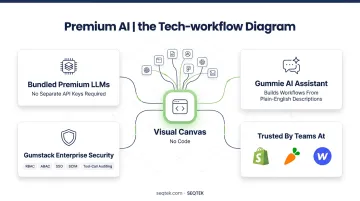
Gumloop is an AI-native workflow automation platform built on a visual canvas where users connect apps and LLM models without code. Teams at Shopify, Instacart, and Webflow use it for marketing, operations, and data workflows.
Its key differentiator: everything is bundled. Premium LLMs are built in — no separate API keys required. The Gummie AI assistant builds workflows from plain-English descriptions. Gumstack provides enterprise-grade security and observability, including RBAC, ABAC, SSO, SCIM, and tool-call auditing.
| Category | Details |
|---|---|
| Best For | AI-first teams and enterprise operations wanting fully AI-native workflow building in a visual, code-free canvas |
| Key AI Features | Gummie AI assistant, built-in LLM models, MCP server, Gumstack security observability |
| Pricing | Free plan available; paid plans from $37/month |
Pipedream
Pipedream is a code-first automation and AI agent-building platform for developer teams. It supports native JavaScript, TypeScript, and Python, connects 3,000+ APIs with 10,000+ prebuilt tools, and includes an MCP server that exposes those integrations directly to AI assistants.
Its step-level logging, introspection, and agent builder with natural language support make it the strongest choice for engineering teams embedding automation into their own products or internal systems.
| Category | Details |
|---|---|
| Best For | Developer teams building AI agents and event-driven automations with extensive API-level control |
| Key AI Features | AI agent builder, natural language workflow design, MCP server with 10,000+ tools, LLM-integrated steps |
| Pricing | Free plan available; paid plans from $29/month (billed annually) |
UiPath
UiPath is the RPA market leader — named a Leader in the 2025 Gartner Magic Quadrant for RPA for the seventh consecutive year and positioned highest for Ability to Execute. It's the go-to platform for large enterprises automating legacy systems, desktop applications, and document-heavy processes that lack modern APIs.
AI-powered document understanding handles classification, extraction, and generative processing. Agentic capabilities via Maestro enable attended and unattended bot orchestration at global scale. Strong governance controls and a proven track record in healthcare, finance, and manufacturing make it the default choice for complex regulated environments.
| Category | Details |
|---|---|
| Best For | Large enterprises automating legacy, desktop, and document-heavy processes at scale with RPA + AI |
| Key AI Features | AI-powered document understanding, computer vision, agentic AI, centralized bot orchestration |
| Pricing | Basic plans from $25/month; Standard and Enterprise require sales contact |
How to Choose the Right AI Workflow Automation Tool
Selecting a platform based on feature count alone is one of the most common mistakes enterprise buyers make. The tools that look best in a demo often underperform in production — because adoption complexity, governance gaps, and total cost of ownership weren't factored in from the start.
A more reliable approach is to evaluate each platform against the specific demands of your environment. Start with these six criteria:
Evaluate Against What Your Organization Actually Needs
| Criterion | Why It Matters |
|---|---|
| AI-native capabilities | Can the tool handle unstructured data, semantic routing, and LLM-driven decisions — or just rule-based logic? |
| Integration breadth | Does it connect your CRM, ERP, communication stack, and custom APIs without heavy workarounds? |
| Ease of use | Will non-technical teams adopt it, or will it become a bottleneck for IT? |
| Governance controls | RBAC, audit logs, and SOC 2 compliance matter in healthcare, finance, and other regulated industries |
| Deployment flexibility | Can it run cloud-only, self-hosted, or on-premise? This determines whether it's viable if data cannot leave your environment |
| Scalability | What happens when automation volume grows 10x? Does pricing and performance hold? |
Match Tool to Organizational Context
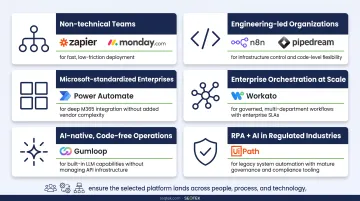
The right tool depends heavily on where your organization sits:
- Non-technical teams: Zapier or Monday.com for fast, low-friction deployment
- Engineering-led organizations: n8n or Pipedream for infrastructure control and code-level flexibility
- Microsoft-standardized enterprises: Power Automate for deep M365 integration without added vendor complexity
- Enterprise orchestration at scale: Workato for governed, multi-department workflows with enterprise SLAs
- AI-native, code-free operations: Gumloop for built-in LLM capabilities without managing API infrastructure
- RPA + AI in regulated industries: UiPath for legacy system automation with mature governance and compliance tooling
Most organizations benefit from a structured implementation partner during platform selection — especially when the choice involves regulated data, cross-department workflows, or legacy system dependencies.
SEQTEK works with enterprises across healthcare, oil & gas, manufacturing, and financial services to assess architecture fit, define automation roadmaps, and ensure the selected platform lands across people, process, and technology. That includes the change management and enablement work that determines whether adoption actually holds.
Conclusion
There's no universal right answer here. The best AI workflow automation tool is the one that fits your organization's technical maturity, regulatory environment, integration landscape, and long-term scalability needs — not just the one with the best brand recognition or the longest feature list.
Before committing, push past the demo. Ask hard questions about real production performance at your volume. Then evaluate on what actually determines long-term fit:
- How strong are the platform's governance and observability capabilities?
- How does pricing scale as automation usage grows?
- Does the vendor's roadmap support agentic workflows and MCP integration?
- What does the vendor's support model look like post-deployment?
The platforms leading in 2026 may look different by 2028. Buying for today's demo is a short-sighted strategy.
Organizations looking to build a structured AI automation strategy — from tool selection and architecture design to team adoption and change management — can reach out to SEQTEK. Since 1999, SEQTEK has helped enterprises across aviation, oil and gas, banking, and manufacturing turn technology decisions into lasting outcomes, with a Localshoring® Delivery Model built around co-development, shared ownership, and knowledge transfer to your internal teams.
Frequently Asked Questions
What are the best workflow automation tools?
The top tools in 2026 depend on your use case. Zapier leads for no-code SaaS automation, n8n for self-hosted deployments, Workato for enterprise-scale orchestration, and Monday.com for project-based teams. The "best" tool comes down to team size, technical maturity, and integration requirements — brand recognition alone won't tell you much.
Is Jira a workflow automation tool?
Jira includes automation capabilities — auto-assigning issues, triggering notifications, and updating fields — but it's primarily a project and issue-tracking platform. It's not a general-purpose workflow automation tool in the way that Zapier or n8n are.
What is the difference between AI workflow automation and traditional automation?
Traditional automation follows fixed if/then rules. AI workflow automation uses LLMs and machine learning to handle unstructured data, interpret context, and route actions based on semantic meaning. This makes it capable of dynamic, judgment-based process execution rather than simple condition matching.
What features should I look for in an AI workflow automation tool?
Prioritize AI-native capabilities (LLM integration, semantic routing), a visual or low-code builder, broad third-party integrations, governance controls (role-based access controls (RBAC), audit logs), and deployment flexibility. These map directly to adoption speed, compliance requirements, and long-term scalability.
Can AI workflow automation tools integrate with existing enterprise systems?
Yes. Enterprise-grade platforms like Workato, Power Automate, and n8n offer deep integrations with CRMs, ERPs, communication platforms, and custom APIs. Integration breadth and API flexibility should be a primary evaluation criterion, so assess them early in your selection process.
How do I get my team to adopt a new workflow automation platform?
Start with a pilot use case that delivers visible time savings, involve end-users in tool selection, and provide role-specific training. In practice, adoption challenges outpace technical ones more often than not. Pairing rollout with clear documentation and structured change management dramatically improves outcomes.